 admin
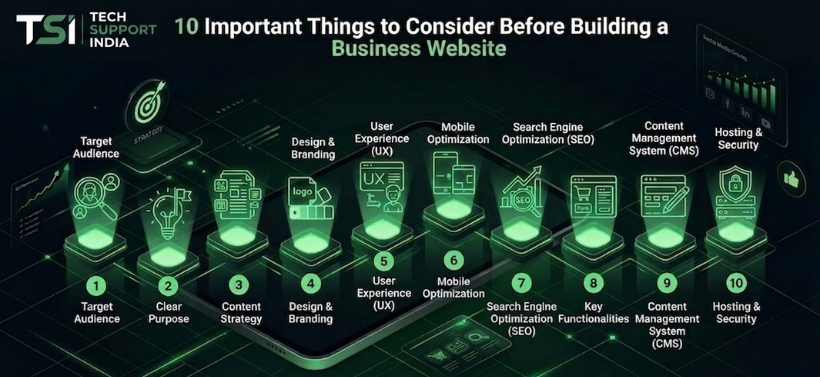
admin10 Important Things to Consider Before Building a Business Website
Starting a business website is one of the smartest investments for any company in today’s digital world. A professional website helps businesses build trust, generate leads, and attract customers online. However, many businesses make common mistakes while creating their website, which affects performance, SEO, and customer experience.
Before building your business website, there are several important factors you should consider to ensure long-term success. In this guide, we will discuss the top 10 important things every business owner should know before creating a website.
1. Choose the Right Domain Name
Your domain name is your business identity on the internet, so choosing the right one is very important. A professional domain name should be clear, easy to type, memorable for users, and closely connected to your brand or business services. For example, a name like techsupportindia.com looks professional and trustworthy.
Why Domain Extension Matters
The domain extension also plays an important role in branding and audience targeting.
- .com – Best for global and professional businesses
- .in – Ideal for Indian audiences and local businesses
- .org – Mostly used by NGOs and non-profit organizations
Choosing the right extension helps users understand your business type and builds trust.
Avoid These Common Mistakes
- Using numbers or hyphens
- Choosing very long names
- Using difficult spellings
- Adding unrelated words
A clean and brand-friendly domain improves your online presence and makes your website look more professional.
2. Make Sure Build a Mobile Responsive Website for Every Device.
Today, more than 70% of users visit websites through smartphones, which means your website must work perfectly on mobile devices. If visitors need to zoom in, scroll unnecessarily, or face slow loading issues, they may leave your website within seconds.
A mobile responsive website automatically adjusts its layout, images, text, and buttons according to different screen sizes like smartphones, tablets, and desktops. This improves user experience and makes your business look more professional.
Why Mobile Responsiveness Matters
- Better user experience
- Higher Google rankings
- Increased customer engagement
- Lower bounce rate
Avoid These Common Mistakes
- Small unreadable text
- Buttons placed too close together
- Slow mobile loading speed
- Large unoptimized images
- Broken layouts on smaller screens
A clean, fast, and mobile-friendly website helps businesses attract and retain more customers online.
3. Improve Your Website Loading Speed
Website loading speed has a direct impact on how users interact with your site as well as how search engines like Google rank it in search results. Most users expect a website to load within 2–3 seconds, and if it takes longer, they may leave before even viewing your content. A slow website can reduce conversions, increase bounce rate, and negatively affect SEO performance.
To improve loading speed, businesses should use optimized images, lightweight website design, fast and secure hosting, browser caching, and compressed CSS or JavaScript files. Avoid adding unnecessary animations, heavy plugins, or large media files that slow down the website.
Simple Ways to Improve Website Speed
- Use compressed and optimized images
- Choose reliable and fast hosting
- Enable browser caching
- Minify CSS and JavaScript files
- Avoid unnecessary plugins and effects
A fast-loading website keeps visitors engaged and helps improve overall website performance.
4. Build an SEO-Friendly Website
Search Engine Optimization (SEO) is one of the most important factors for making your business website successful. A well-optimized website helps your pages appear in Google search results and brings organic traffic without spending too much on ads. If your website is not SEO-friendly, potential customers may never find your business online.
Basic SEO Elements
- Proper heading tags (H1, H2, H3)
- Keyword optimization
- Meta titles and descriptions
- Internal linking
- Fast loading speed
Along with these basics, it is also important to create quality content that answers users’ questions clearly. Mobile-friendly design, optimized images, and secure HTTPS hosting also improve SEO performance. Search engines prefer websites that load quickly and provide a good user experience. An SEO-friendly website not only increases online visibility but also helps build trust and attract more potential customers over time.
5. Use Professional Website Design
Your website’s design reflects your brand identity and shapes how visitors perceive your business. When visitors open your website, the design, layout, and overall appearance immediately influence how they feel about your brand. A clean, modern, and professional design helps build trust and encourages users to stay longer on your website. On the other hand, a cluttered or outdated design can make visitors leave quickly.
Important Design Features
- Simple layout
- Clear navigation menu
- Professional color combination
- Readable fonts
- High-quality images
It is also important to make sure your website looks good on both desktop and mobile devices. Proper spacing, balanced colors, and organized sections improve readability and user experience. Avoid using too many animations, pop-ups, or unnecessary elements that can distract visitors. A professionally designed website not only looks attractive but also helps convert visitors into potential customers.
6. Add Clear Call-to-Action Buttons
A business website should guide visitors toward taking the next step. Call-to-action (CTA) buttons help users quickly understand what action they should take, whether it is contacting your business, booking a service, or making a purchase. Clear and visible CTAs improve user engagement and increase conversion chances.
Examples of CTA Buttons
- Contact Us: Helps visitors easily reach your business for inquiries or support.
- Get Free Quote: Encourages potential customers to request pricing or service details.
- Call Now: Allows users to directly connect with your business for quick communication.
- Book Consultation: Useful for businesses offering professional advice or appointments.
- WhatsApp Us: Makes communication faster and more convenient for users.
CTA buttons should be placed in important sections like the homepage, service pages, and contact section so visitors can easily take action without searching for information.
7. Secure Your Website with SSL Certificate
Website security plays an important role in building customer trust and protecting important information. An SSL certificate encrypts the data shared between users and your website, making it safer from online threats. Websites with SSL display a secure padlock icon in the browser, which helps visitors feel more confident while browsing your site. It also improves your website’s credibility and supports better search engine rankings.
Benefits of SSL
- Improves Website Security: Encrypts user data and protects it from cyber threats.
- Builds Customer Trust: Visitors feel safer when they see the secure padlock icon.
- Helps in Google Rankings: Search engines prefer secure HTTPS websites.
- Protects Sensitive Information: Keeps login details, contact forms, and payment data secure.
- Creates Professional Credibility: A secure website looks more reliable and trustworthy.
Always use HTTPS instead of HTTP to provide a secure browsing experience for your visitors.
8. Create User-Friendly Navigation
A business website should help visitors easily find the information they need. User-friendly navigation allows users to quickly access important pages like services, about us, and contact details without confusion. Simple and well-organized navigation improves user experience and keeps visitors engaged on your website for longer.
Navigation Best Practices
- Keep Menu Simple: Avoid adding too many menu options that can confuse visitors.
- Use Clear Page Names: Page titles should be easy to understand and directly related to the content.
- Add Important Pages in Header: Keep essential pages like Home, Services, About, and Contact visible in the top menu.
- Include Footer Links: Add quick links in the footer for better accessibility and navigation.
- Maintain Proper Structure: Organize pages and categories in a logical way for smooth browsing.
- Make Navigation Mobile-Friendly: Ensure menus work properly on smartphones and tablets.
Simple and organized navigation improves user experience and helps visitors explore your website more efficiently.
9. Include Contact Information Clearly
Your website should make it easy for customers to reach your business. Clear contact information helps build trust and improves communication with potential clients.
Important Contact Details
- Phone number
- Email address
- Office address
- Contact form
- WhatsApp button
It is also recommended to have a separate Contact Us page so users can quickly find all the ways to connect with your business in one place.
10. Choose the Right Hosting Provider
Your hosting provider plays a major role in your website’s overall performance. It directly affects how fast your website loads, how secure it is, and how often it stays online. A poor or cheap hosting service can result in slow loading speed, frequent downtime, and a bad user experience, which may also impact your search engine rankings. That’s why choosing a reliable hosting provider is important for any business website.
What to Look for in Hosting
- Fast Servers: Ensures your website loads quickly for better user experience.
- Good Uptime: Your website should remain online most of the time without frequent crashes.
- Customer Support: 24/7 support helps resolve technical issues quickly.
- Security Features: Protects your website from malware, hacks, and data breaches.
- Scalability: Allows your website to grow smoothly as your traffic increases.
Investing in a reliable hosting service ensures better speed, stronger security, and a smooth experience for your website visitors.
Final Thoughts
Building a business website requires proper planning and a clear strategy. A professional, fast, secure, and SEO-friendly website can help your business grow online and attract more customers.
Before creating your website, it is important to focus on design, speed, SEO, mobile responsiveness, and user experience, as these factors play a key role in your website’s overall success.
If you are planning to build a professional business website, you can connect with Tech Support India for guidance and support. Feel free to discuss your requirements and get the right solution for your business needs.